【重要】112-2圖書館畢業論文比對、上傳及繳交流程及注意事項 Spring-Summer 2024, Library Notices for thesis submission
【圖書館重要通知】112-2 研究生畢業論文比對、上傳及繳交流程重大異動說明
教育部委託國家圖書館開發之「學位論文相似檢測輔助系統」已開放試營運,為完善本校學位論文品保機制,即日起全面適用至本學期應屆畢業研究生。除原 Turnitin 比對流程外,新增至國圖檢測系統比對之必經流程!
論文交叉檢測新制流程圖:
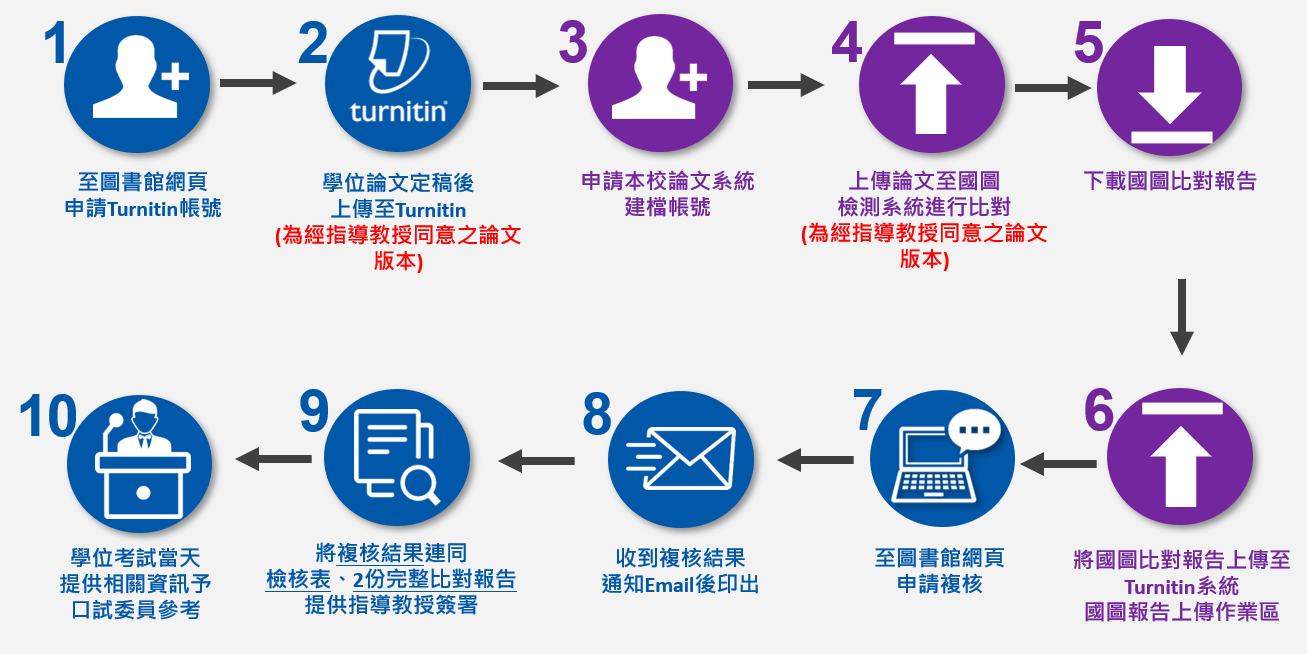 (註:上圖中紫色圓圈處為本次新增之國圖系統比對流程)
國圖檢測系統比對流程四步驟:
至本校論文系統申請建檔帳號。請參見 ➔ 論文系統建檔說明 的「1.帳號申請」頁籤。建置完成後登入系統,點選左上角「論文檢測」連結。
將論文初稿上傳至國圖系統。
限制比對僅限 5 次(第 4、5 次須待 24 小時後方可上傳,請審慎使用)。
須包含封面、摘要、目錄、本文及參考文獻之完整文稿。
檢測系統完成剖析後,請親自自國圖檢測系統上下載完整的論文相似度比對報告。
將下載的國圖比對報告,重新上傳至 Turnitin 系統中的「國圖報告上傳作業區」。
備註:若口試前來不及完成,可於口試後補檢測,但務必於電子論文上傳前完成。
完成上述所有檢測流程後,請依後續規定申請圖書館複核。於簽署學位論文檢核表時,務必同時提供「Turnitin」及「國圖檢測系統」共 2 份完整的比對報告供指導教授參閱。
圖書館學位論文相關專區快速連結:
- 國圖系統帳號申請業務:圖書館 林小姐(校內分機 3136 / 信箱:weiling@ntut.edu.tw)
- 國圖操作、比對報告及複核業務:圖書館 李先生(校內分機 3113 / 信箱:af7440@ntut.edu.tw)
- 學術倫理叮嚀:論文比對之目的為提供同學自我檢視文稿,請勿使用不當手段技術性規避比對,以免違反學術倫理及影響學校研究風氣。
[Library Notice] Thesis Submission Procedures and Similarity Detection Updates (Spring-Summer 2024)
The new similarity detection system, WriteAid Similarity Scanner, developed by the National Central Library (NCL) is now on trial from May 30 to July 31. To ensure academic integrity, every graduate student who has the oral defense this semester MUST run the similarity report on WriteAid and complete the library review from now on.
Dual-System Similarity Scanning Flowchart:
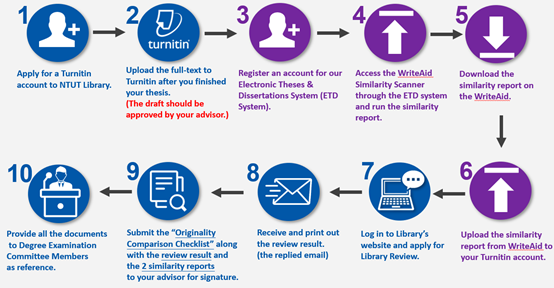 (Note: Please follow the purple circles as shown above to run the mandatory WriteAid similarity report)
Instructions for WriteAid Similarity Scanning:
Register an account from our Electronic Theses & Dissertations System (ETD System). Follow the guide ➔ 1.Account Registration here. Once activated, log in and access "Similarity Scanner" on the top left.
Upload your full-text draft approved by your advisor to WriteAid Scanner.
Strictly limited to 5 times by NCL (Do not waste any runs).
The upload must be a complete thesis including cover, abstract, contents, references, etc.
Once the scanner finishes parsing and analyzing your document, please download the complete similarity report directly from the system.
Upload the downloaded WriteAid report to the Turnitin assignment titled "Upload the report to the National Central Library's WriteAid Similarity Scanner" for the library review process.
If you cannot complete everything before your oral defense due to tight schedules, you may run the report after your oral defense as a make-up. However, please make sure to run the report BEFORE you upload your final electronic thesis.
Quick Access for Plagiarism Tools:
- Final Verification Requirement: After finishing all procedures above, please proceed with the regular library review process, including signing the checklist. You must provide TWO complete similarity reports (Turnitin & WriteAid) to your advisor for review.
- Academic Integrity Statement: The purpose of similarity scanning is for self-evaluation. Do not use improper technical means to cheat on or bypass the report, as this violates academic ethics and compromises research integrity.